

About Configuration Tool
You can manage multiple machines and change settings using Configuration Tool from a computer running Windows.
Start Configuration Tool plug-in by following the procedure below.
-
Click [Start], and then select [All Programs] > [Okidata] > [Configuration Tool] > [Configuration Tool].
The start screen is displayed.
-
Select the machine from [Registered Device Table].
The [Device Info] screen is displayed.
Configuration Tool
This section describes the name and function of each screen.
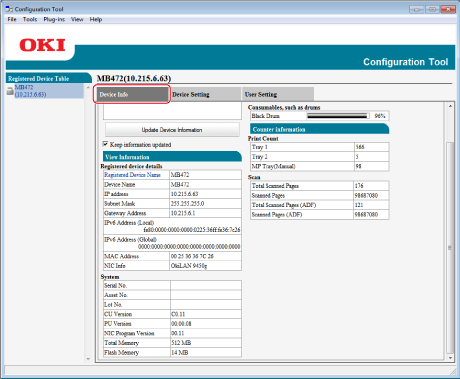
[Device Info] tab
The status and information of the machine are displayed.
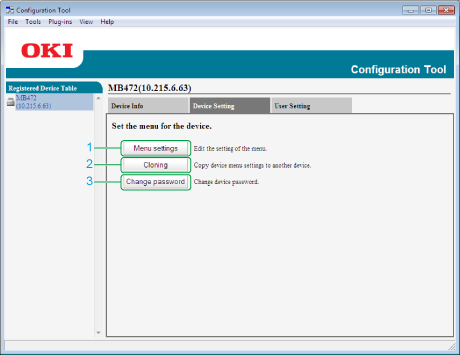
[Device Setting] tab
Set the device menu.
|
Item |
Description |
|
|---|---|---|
|
1 |
Menu Settings |
Edit the setting of the menu. |
|
2 |
Cloning |
Copy device menu settings to another device. |
|
3 |
Change password |
Change device password. |
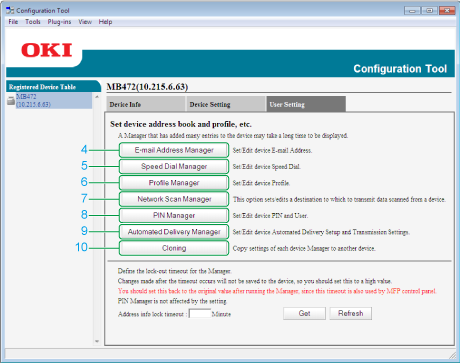
[User Setting] tab
Set the device address book, profile, or other settings.
|
Item |
Description |
|
|---|---|---|
|
4 |
E-mail Address Manager |
Set/Edit device E-mail Address. |
|
5 |
Speed Dial Manager |
Set/Edit device Speed Dial. |
|
6 |
Profile Manager |
Set/Edit device Profile. |
|
7 |
Network Scan Manager |
This option sets/edits a destination to which to transmit data scanned from a device. |
|
8 |
PIN Manager |
Set/Edit device PIN and User. |
|
9 |
Automated Delivery Manager |
Set/Edit device Automated Delivery Setup and Transmission Settings. |
|
10 |
Cloning |
Copy settings of each device Manager to another device. |
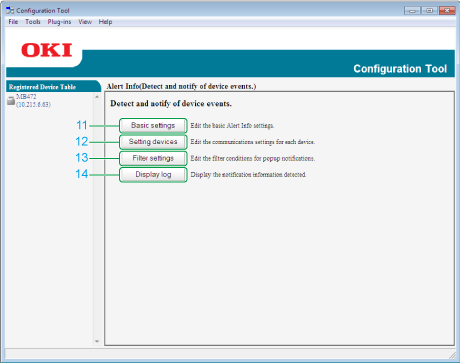
[Alert Info] plug-in
Detect a device event and sends a notification.
|
Item |
Description |
|
|---|---|---|
|
11 |
Basic settings |
Edit the basic Alert Info settings. |
|
12 |
Setting devices |
Edit the communications settings for each device. |
|
13 |
Filter settings |
Edit the filter conditions for popup notifications. |
|
14 |
Display log |
Display the notification information detected. |
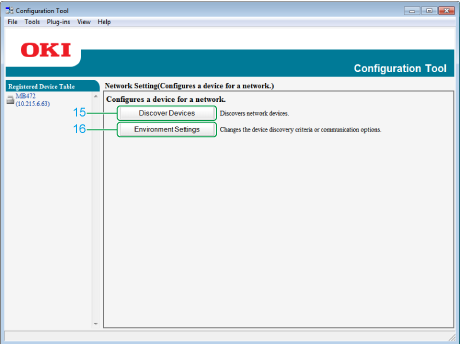
[Network Setting] plug-in
Set the device network.
|
Item |
Description |
|
|---|---|---|
|
15 |
Discover Devices |
Discovers network devices. |
|
16 |
Environment Settings |
Changes the device discovery criteria or communication options. |
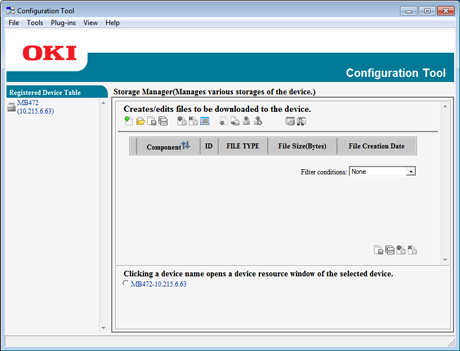
[Storage Manager] plug-in
Create or edit a file to download to a device.
-
Registration and deletion of form data
-
Management of a stored job
List of Icons used in Configuration Tool
|
Icon name |
Description |
|
|---|---|---|

|
New(E-mail Address) |
Registers a new e-mail address. |

|
New(Group) |
Registers a new e-mail address group. |

|
New(Speed Dial) |
Registers a new speed dial number. |

|
New(Group) |
Registers a new speed dial number group. |

|
New |
Registers a new profile. |

|
Create by Copying |
Copy content of items whose check boxes are selected, and create a new document profile. |

|
New(PIN) |
Registers a new PIN number. |

|
New(User) |
Registers a new user. |

|
LDAP server |
Specifies LDAP server for referring to the user related to the PIN. |

|
Displays PIN as Standard |
Switches to the list display based on the PIN codes. |

|
Displays User as Standard |
Switches to the list display based on the user names. |

|
New |
Register a new automatic setting delivery number. |

|
Reread Settings |
Reloads the setting information of this machine. |

|
Save to device |
Saves the settings in the machine. |

|
Delete |
Deletes the specified items. |

|
Delete and Sort |
Deletes the specified items, and then moves up other items. |

|
Delete all |
Deletes all items. |

|
Export to file |
Export the current settings to a file. |

|
Import from file |
Imports the settings from a file. |

|
Return to top page |
Returns to the top page. |

|
Back |
Returns to the previous page. |
|
|
Return to before changes |
Cancels the last change. |
|
|
Display administrator settings |
Displays the administrator setting. |
|
|
Backup settings |
Saves settings of the device displayed on the screen in a file. |
|
|
Restore settings |
Restores the settings of the device that are stored in an external file. |
|
|
Discover Devices |
Searches for the machine again. |
|
|
Environment Settings |
Changes search conditions for this machine. |
|
|
Device Settings |
Changes the IP address of the machine. |
|
|
Restart device |
Restarts the machine. |
|
|
Change Password |
Changes the network password. |
|
|
Display Web Page |
Display the Web page of this machine. |
|
|
New Project |
Creates a new project. |
|
|
Open Project |
Opens a project. |
|
|
Save Project |
Saves a project. |
|
|
Save as... |
Saves the project under a name. |
|
|
Add File to Project |
Adds a file to a project. |
|
|
Remove file from project |
Deletes a file from a project. |
|
|
Open a macro file filtering window |
Displays a filtering screen of the PCL form file. |
|
|
Create download file |
Creates a download file. |
|
|
Send download file to printer |
Sends a download file. |
|
|
Send project file to printer |
Sends a project. |
|
|
Send file(s) to printer |
Sends a file. |
|
|
Open a job Management window |
Displays the job control screen. |
|
|
Open an Administrator Functions window |
Displays the administrator function screen. |


