

Adjusting the Density (Density)
You can adjust the copy density in seven levels.
-
Press
 (COPY).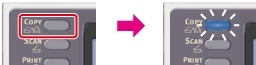
-
Set a document in the ADF or on the document glass.
-
Press
 to display the [Change Settings] menu.
 -
Press
 to select [Image Settings], and then press
  (OK).
(OK).
-
Check that [Density] is selected, then press
(OK). -
Press
 or to select the desired density, and then press (OK).
Available density settings
+3,
 +2,+1,0*,-1,-2,-3
* indicates the factory default setting.
Memo
[0] is the standard value. To increase the density, select [+1], [+2], or [+3] (darkest). To decrease the density, select [-1], [-2], or [-3] (lightest).
-
Press
 (START).
Copying starts.