

Changing the Document Orientation (Direction)
You can select [Portrait] or [Landscape] for the document orientation. Specify the appropriate orientation to get the copy result you want.
-
Press
 (COPY).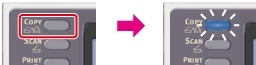
-
Set a document in the ADF or on the document glass.
-
Press
 to display the [Change Settings] menu.
 -
Press
 to select [Direction], and then press
  (OK).
(OK). -
Press
to select the document orientation, and then press (OK).Available orientation settings
Portrait*,
 Landscape
* indicates the factory default setting.
-
Press
 (START).
Copying starts.