

Receiving a Document That is Saved in a Destination Bulletin Board Box by Fax (Fcode Polling)
You can perform Fcode polling communication (Fcode polling) by entering the sub address of an Fcode bulletin board box that is registered to the sender's machine. With this function, the sender's machine sends a fax in response to instructions from your machine.
Note
If a password is set to a bulletin board box of the sender's machine, your machine cannot receive a fax.
-
Press
 (FAX).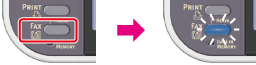
-
Check that [Fax] is selected, and then press
 (OK).
(OK).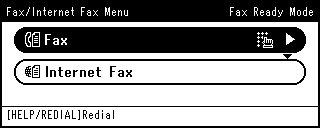
-
Press
 to select [Fax Functions], and then press (OK).
-
Press
to select [Fcode Polling], and then press (OK).
-
Press
to select [ON], and then press (OK).
-
Enter the sub address of the bulletin board box that is registered to the sender's machine.
The sub address is up to 20 characters in length.
-
Select [Enter], and then press
(OK). -
Press
 until the start screen is displayed.
 -
Press
 to select [Add Destination], and then press (OK).
-
Specify the sender's machine.
-
Press
 (START).
Memo
Documents that are received with Fcode polling are automatically printed.