

Checking, Deleting or Changing a Specified Destination
Checking a Destination
-
Press
 to select a specified destination on the start screen, and then press
  (OK).
(OK).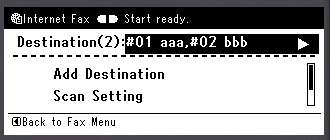
-
Press
 to select a destination type to check, and then press (OK).
The destination types are [To], [Cc], and [Bcc].
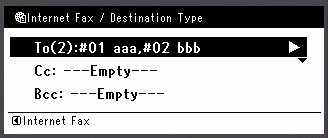
-
When you check a destination, press
 twice.
 -
Check that [Close The List] is selected, and then press
(OK).
Deleting a Destination
-
Press
to select a specified destination on the start screen, and then press (OK).
-
Press
to select a destination type that includes a destination to delete, and then press (OK).
The destination types are [To], [Cc], and [Bcc].
-
Press
to select a destination to delete, and then press (OK).
The check box is selected. You can select multiple destinations.
-
When you complete the selection of all the destinations to delete, press
. -
Press
to select [Delete The Address], and then press (OK).
Changing the Destination Type
-
Press
to select a specified destination on the start screen, and then press (OK).
-
Press
to select a destination type that includes a destination to change, and then press (OK).
The destination types are [To], [Cc], and [Bcc].
-
Press
to select a destination to change, and then press (OK).
The check box is selected. You can select multiple destinations.
-
When you complete the selection of all the destinations to change, press
. -
Check that [Edit Destination Type] is selected, and then press
(OK). -
Press
to select a destination type from [To], [Cc], and [Bcc], and then press (OK).