

Enabling the Scan to Fax Server Function
To enable the Scan to Fax Server function, follow the procedure below in Admin Setup.
Note
If the Scan to Fax Server function is enabled, the fax function is disabled.
-
Press
 (SETTING).
 -
Press
 to select [Admin Setup], and then press
  (OK).
(OK).
-
Select [Enter], and then press
(OK). -
Press
to select [FaxServer Function], and then press (OK).
-
Press
to select [Environmental Settings], and then press (OK). -
Press
to select [FaxServer Function], and then press (OK). -
Select [ON], and then press
(OK).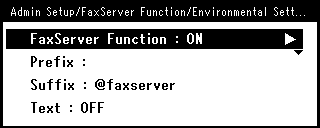
-
Restart the machine.