

Editing a Destination E-mail Address
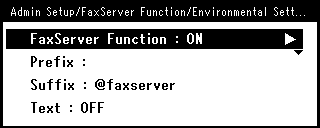
A prefix and suffix are used in the following format. The "Fax number" in this format is a number that is selected in the "Add Destination" item.
"Prefix + Fax number + Suffix"
For example, if you set "FAX=" as the prefix and set "@faxserver" as the suffix and perform the Scan To Fax Server function, the e-mail destination (To:) is set as "FAX=012-345-6789@faxserver".
Note
Set the prefix and suffix according to the e-mail reception specifications of the fax server. The virtual domain and others may be required to be set on the mail server due to the certain fax server operating environment.
-
Press
 (SETTING).
 -
Press
 to select [Admin Setup], and then press
  (OK).
(OK).
-
Select [Enter], and then press
(OK). -
Press
to select [FaxServer Function], and then press (OK).
-
Press
to select [Environmental Settings], and then press (OK). -
Press
to select [Prefix], and then press (OK). -
Enter a character string.
-
Press
to select [Suffix], and then press (OK). -
Enter a character string.
-
Press
 until the top screen is displayed.