

Editing E-mail Body Text
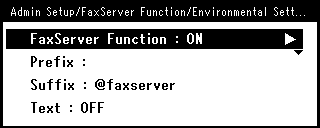
If [Text] is set to [ON], the text is added to the e-mail. If your fax server supports the transmission of e-mail text, the text is included in the fax transmission data.
-
Press
 (SETTING).
 -
Press
 to select [Admin Setup], and then press
  (OK).
(OK).
-
Select [Enter], and then press
(OK). -
Press
to select [FaxServer Function], and then press (OK).
-
Press
to select [Environmental Settings], and the press (OK). -
Press
to select [Text], and then press (OK).
-
Press
to select [ON], and then press (OK).
-
Enter the texts.
-
Select [Enter], and then press
(OK). -
Press
 until the top screen is displayed.