

Installing the wireless LAN module (ES4172LP MFP only)
-
Turn off the machine and then unplug the power code.
-
Open the connector cover by pressing the knob (1) of the cover.

-
Connect the connector (2) of the connection cable to the wireless LAN module (3), and then install the module to the printer.
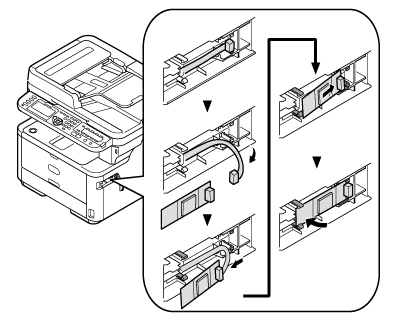
-
Close the cover.

After the wireless LAN module is installed, the machine needs to enable the setting.
-
Press [Setting] button on the operator panel.
-
Press [Admin Setting].
-
Press [User Install].
-
Press [Wireless Module].
-
Press [Enable].