

Registering or Deleting a Destination (Profile) from the Web page
You can register up to 50 profiles.
This section describes the registration and deletion methods that use the Web page on a computer.
Changing a Profile
-
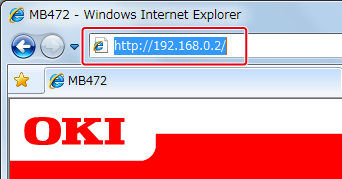
Open a Web browser.
-
Enter the URL, "http://(The IP address of this machine)" in the address bar, and then press the <Enter> key.
About the IP Address of this machine, refer to the Network section of "View Information" of the Setting Menu Items and Functions.
-
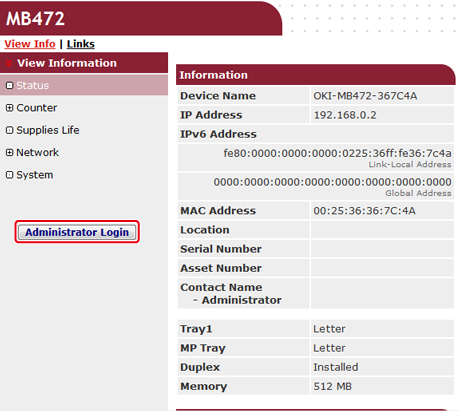
Click [Administrator Login].
-
Enter "root" in [User Name] and the administrator password of the machine in [Password], and then click [Log In].
For Mac OS X, enter "root" in [Name] and the administrator password of the machine in [Password], and then click [Login].
-
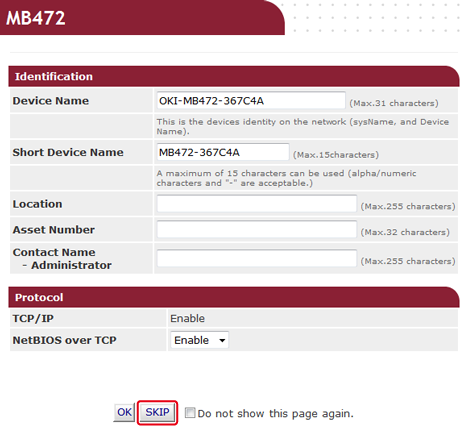
Click [SKIP].
-
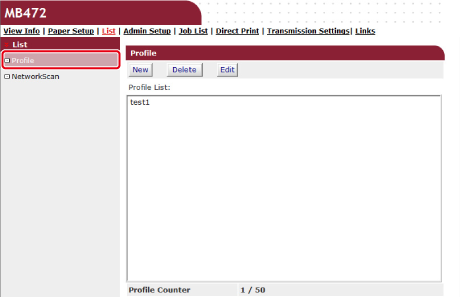
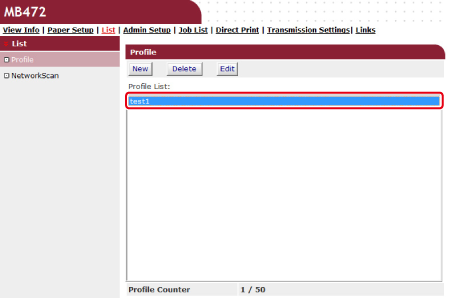
Click [List] at the top of the screen.
-
Click [Profile] on the left side of the screen.
-
Click a profile to change.
-
Click [Edit].
-
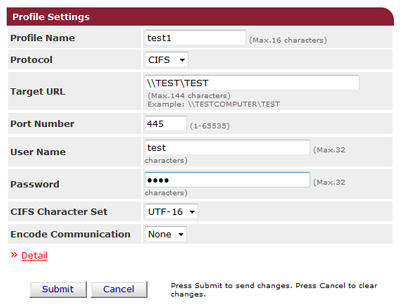
Edit the profile if necessary.
-
Click [Submit].
Deleting a Profile
-
Open a Web browser.
-
Enter "http://(The IP address of this machine)" in the address bar, and then press the <Enter> key.
About the IP Address of this machine, refer to the Network section of "View Information" of the Setting Menu Items and Functions.
-
Click [Administrator Login].
-
Enter "root" in [User Name] and the administrator password of the machine in [Password], and then click [Log In].
For Mac OS X, enter "root" in [Name] and the administrator password of the machine in [Password], and then click [Login].
-
Click [SKIP].
-
Click [List] at the top of the screen.
-
Click [Profile] on the left side of the screen.
-
Click a profile to delete.
-
Click [Delete].
-
Click [OK] in a dialog box.