

Setting the Country Code
Note
-
Select the correct country code.
-
If [Country Code] is set to an incorrect value, fax transmissions and receptions may not function correctly. If a fax transmission or reception fails even with the correct line connection, check [Country Code] first.
-
Turn the machine on.
-
Press
 (SETTING).
 -
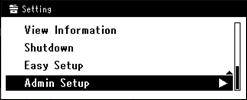
Press
 to select [Admin Setup], and then press
  (OK).
(OK).
-
Enter the administrator password.
-
Select [Enter], and then press
(OK). -
Press
to select [Fax Setup], and then press (OK).
-
Press
to select [Fax Setting], and then press (OK).
-
Press
to select [Country Code], and then press (OK).
-
Press
 or to select a country name, and then press (OK).
Memo
-
If your country is the Czech Republic or Slovak Republic, select [Czech/Slovakia].
-
If your country is Canada, select [U.S.A].
-
If the region of your country is Latin America, select [Latin America].
-
If the region of your country is Europe or Middle East, select [International].
-
The following country codes can be set.
U.S.A., International, United Kingdom, Ireland, Norway, Sweden, Finland, Denmark, Germany, Hungary, Czech/Slovakia, Poland, Switzerland, Austria, Belgium, Netherlands, France, Portugal, Spain, Italy, Greece, Australia, New Zealand, Singapore, Hong Kong, Latin America, Mexico, China, Russia, Taiwan, Japan, Korea, Thailand, Malaysia, Jordan, Argentina, Brazil, South Africa, Belarus, Moldova, Turkey, Ukraine
-
-
When a confirmation message is displayed, press
(OK).The machine automatically restarts and the default screen is displayed a few minutes later.
-
Turn the machine off.
Memo
If [Country Code] is changed, the values of [PBX Line] and [MF(Tone)/DP(Pulse)] are changed to the default value of each country.