

Setting a Reception Mode
The most appropriate reception mode varies depending on the environment where you use the machine. Check with the following description.
[Fax Ready Mode] is set by factory default.
-
[Fax Ready Mode]
If you use the machine only for faxes, this mode is recommended.
-
[Tel/Fax Ready Mode]
If you connect a telephone, this mode is recommended.
-
[Ans/Fax Ready Mode]
If you connect an answering machine, this mode is recommended.
-
[Tel Ready Mode]
If you often use the machine as a telephone, this mode is recommended.
-
[DRD]
If you use the distinctive ring detection (DRD) function that is provided by a telephone company, this mode is recommended.
-
Press
 (SETTING).
 -
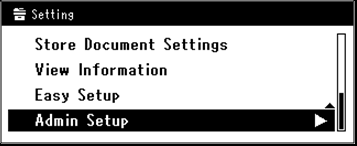
Press
 to select [Admin Setup], and then press
  (OK).
(OK).
-
Enter the administrator password.
-
Select [Enter], and then press
(OK). -
Press
to select [User Install], and then press (OK).
-
Press
to select [Reception Mode], and then press (OK).
-
Press
to select the reception mode, and then press (OK).
Available reception mode settings:
Fax Ready Mode*,
 Tel/Fax Ready Mode,Ans/Fax Ready Mode,Tel Ready Mode,DRD
* is the factory default setting.
-
Press
 until the top screen is displayed.