Initializing the Network Settings
Note
This procedure initializes all the network settings.
Initializing from Setting Menus of this Machine
You can restore the network settings to the factory default settings.
-
Press
 (SETTING).
 -
Press
 to select [Admin Setup], and then press
  (OK).
(OK). -
Enter the administrator password.
-
Select [Enter], and then press
(OK). -
Press
to select [Network Menu], and then press (OK). -
Check that [Network Setup] is selected, and then press
(OK). -
Press
to select [Factory Defaults], and then press (OK). -
Check that [Execute] is selected, and then press
(OK). -
Press
 or
or  to select [Yes], and then press (OK).
The network card is rebooted to initialize the settings.
Initializing from the Operator Panel of this Machine (Boot Menu)
If you cannot initialize from the configuration menu of this machine, you can initialize from the operator panel.
-
Turn on the machine while pressing
.The OKI's logo is displayed.
-
Enter the administrator password.
-
Select [Enter], and then press
(OK).The [Boot Menu] screen is displayed.
-
Press
 or to select [Network Factory Defaults], and then press (OK).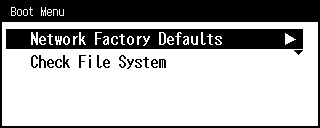
-
Press
or to select [Yes], and then press (OK).