

Checking or Changing the Use of Cloud Service Settings
You can check and edit the Google Cloud Print settings.
Checking the Use of Cloud Service Settings
Check the use status of the Cloud service from the Web page of this machine.
-
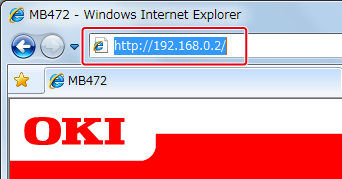
Open a Web browser.
-
Enter "http://(The IP address of this machine)" in the address bar, and then press the <Enter> key.
About the IP Address of this machine, refer to the Network section of "View Information" of the Setting Menu Items and Functions.
-
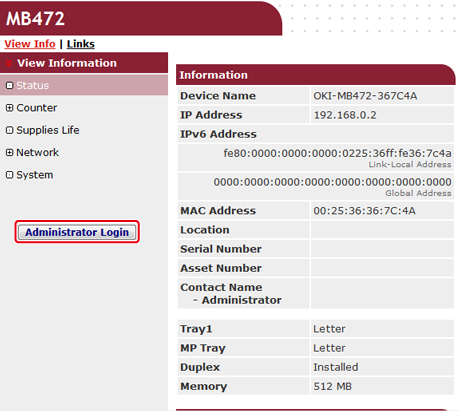
Click [Administrator Login] on the top screen.
Memo
The factory default user name and password for [Administrator Login] are "root" and "aaaaaa", respectively.
-
Click [SKIP].
-
Click [View Information].
-
Click [Network].
-
Click [Google Cloud Print].
-
Click [Using Cloud Service].
The use status is displayed. There are three use statuses:
Enable: You can print automatically or manually.
Pause: You can print manually. Set this status if you do not want to print automatically.
Disable: You cannot print. Set this status if you want to suspend the use of Google Cloud Print or other cases.
Changing from the Web page
Change the Use of Cloud Service settings from the Web page of this machine.
-
Open a Web browser.
-
Enter "http://(The IP address of this machine)" in the in the address bar, and then press the <Enter> key.
About the IP Address of this machine, refer to the Network section of "View Information" of the Setting Menu Items and Functions.
-
Click [Administrator Login] on the top screen.
Memo
The factory default user name and password for [Administrator Login] are "root" and "aaaaaa", respectively.
-
Click [SKIP].
-
Click [View Information].
-
Click [Network].
-
Click [Google Cloud Print].
-
Click [Using Cloud Service].
-
Change settings.
Changing from the Operator Panel
-
Press
 (SETTING).
-
Press
 to select [Google Cloud Print], and then press
  (OK).
(OK).
-
Press
to select [Google Cloud Print Settings], and then press (OK).
-
Press
to select [Use of Cloud Service], and then press (OK). -
Change settings.