Checking That Deletion is Complete
You can check whether the machine is deleted from Google Cloud Print in one of the following three ways.
Checking from the Management Screen of Google Cloud Print
-
Access the Google Web site from a computer, smartphone, or other mobile device.
Google Web site (https://accounts.google.com)
-
Enter the Google account information, and then click [Sign in].
-
Click [Print].
Check that the machine is not displayed.
Checking from the Web Page
-
Open a Web browser.
-
Enter "http://(The IP address of the machine)" in the in the address bar, and then press the <Enter> key.
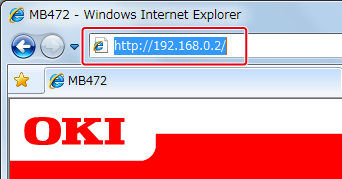
About the IP Address of this machine, refer to the Network section of "View Information" of the Setting Menu Items and Functions.
-
Click [Administrator Login] on the top screen.
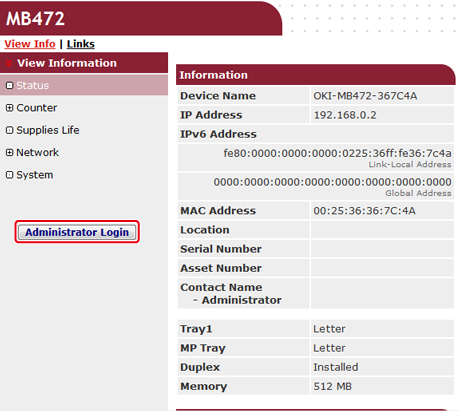
Memo
The factory default user name and password for [Administrator Login] are "root" and "aaaaaa", respectively.
-
Click [SKIP].
-
Click [View Information].
-
Click [Network].
-
Check that [Registered] is displayed for [Google Cloud Print].
Checking from the Operator Panel
-
Press
 (SETTING).
-
Press
 to select [Google Cloud Print], and then press
  (OK).
(OK).
-
Check that the two items, [Register to Google Cloud Print] and [Google Cloud Print Settings] are displayed.
If the Registration Information Remains on the Google Cloud Print Administrator Screen
If you delete the registration information by following the procedure in "Deleting the Registered Information" with the machine not being connected to a network, the registered machine may remain on the Google Cloud Print administrator screen (https://www.google.com/cloudprint). In such a case, delete the machine on the Google Cloud Print administrator screen.
If You Deleted the Information on the Google Cloud Print Administrator Screen
If you deleted the registered machine on the Google Cloud Print administrator screen (https://www.google.com/cloudprint), the registration information remains in the machine. In such a case, delete the registration information from the operator panel of the machine.
-
Press
(SETTING).
-
Press
to select [Google Cloud Print], and then press (OK).
-
Press
to select [Delete Registered Information], and then press (OK).

-
Select [Yes].