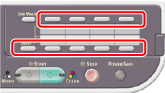
Using a One-touch Key Pad
You can select an e-mail address that is registered in the address book with the one-touch key. The address book numbers, 01 to 16 are automatically assigned to one-touch keys.
Note
Entries from the one-touch keys are available only for [To]. For [CC] and [Bcc], use other entry methods.
-
Select Scan To E-mail function, and then press the one-touch key of the destination to send an e-mail.
-
A destination is added to [To].
-
To add multiple destinations, press another one-touch key.
-
To select the numbers that are assigned to the 09 to 16 one-touch keys, press the one-touch key while pressing and holding  (SHIFT).