

USB Connection
For Windows
-
Press
 (SCAN).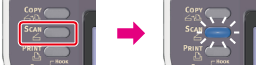
-
Set a document in the ADF or on the document glass.
-
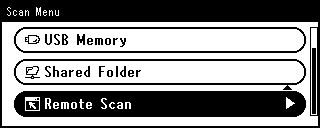
Press
 to select [Remote Scan], and then press
  (OK).
(OK).
-
Check that [TWAIN] is selected, and then press
(OK). -
Check that [Select A Connecting PC] is selected, and then press
(OK). -
Press
to select [From USB Interface], and then press (OK).
-
Press
 or
or  .
.Scanning starts.
-
Start ActKey on the computer.
If the scanner selection screen is displayed, select [OKI MB5(4)x2/ES5(4)1x2 USB] or [OKI Universal Twain USB], and then click [OK].
-
Click a scan button on the launcher.
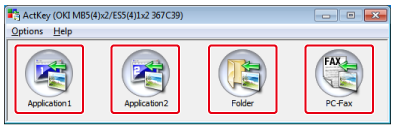
Scanning starts.
A scanned image is opened with the application, saved in a folder, or sent with PC-FAX according to the scan button you click.
Memo
-
If you select [Application1] or [Application2], an application that is associated with a file format starts, and the scanned image is displayed in the application.
-
If you select [Folder], the scanned document is saved in the specified folder.
-
If you select [PC-Fax], the fax transmission application starts, and the scanned document is sent to the application. Send a fax with the fax transmission software on your computer.
For Mac OS X
The following procedure uses Image Capture as an example.
-
Press
(SCAN).
-
Set a document in the ADF or on the document glass.
-
Press
to select [Remote Scan], and then press (OK).
-
Check that [TWAIN] is selected, and then press
(OK). -
Check that [Select A Connecting PC] is selected, and then press
(OK). -
Press
to select [From USB Interface], and then press (OK).
-
Press
or .Scanning starts.
-
Start Image Capture on the computer.
-
Select this machine from the list on the left side of Image Capture.
-
Click [Scan].
Scanning starts.