

Installing This Machine as a WSD Device to a Computer
Install this machine as a WSD Scan device with a Windows computer that supports WSD Scan so that you can use the WSD Scan function.
For details on WSD Scan, refer to "About WSD Scan".
Note
-
If a computer for WSD Scan recognizes this machine and the IP address of this machine is changed, you must register from scratch. Uninstall this machine, and then install it again.
-
Before starting this installation, check that Network Search is enabled.
From [Control Panel], click [Network and Internet] > [Network and Sharing Center] > [Change advanced sharing settings], select [Turn on network discovery] for [Network discovery], and then click [Save Changes].
Memo
You can register up to 50 computers in this machine.
Installing This Machine in a Computer
-
Click [Start], and then select [Computer] > [Network].
The devices that are connected to the network are displayed.
-
Right-click MB472 icon, and then select [Install].
If the [User Account Control] dialog box is displayed, click [Yes].
-
When a balloon message is displayed to inform you that the installation is complete on the task bar, click the balloon to check the details, and then click [x (Close)].
Check the device installation on the machine as follows.
Checking That the Machine is Connected to a Computer
-
Press
 (SCAN).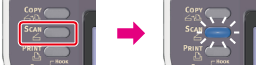
-
Press
 to select [Computer], and then press
  (OK).
(OK).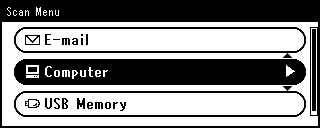
-
Check that [Select A Connecting PC] is selected, and then press
(OK). -
Press
to select [From WSD Scan], and then press (OK). -
Check that a computer is displayed on this machine as a connection destination of WSD Scan.