

Scanning from a Computer
Simple Scan Mode
-
Press
 (SCAN).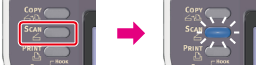
-
Set a document in the ADF or on the document glass.
-
Start a scan program on the computer.
-
Click a scan button in the scan program.
Scanning starts.
Manual Scan Mode
-
Press
(SCAN).
-
Set a document in the ADF or on the document glass.
-
Press
 to select [Remote Scan], and then press
  (OK).
(OK).
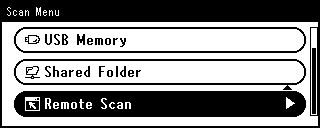
-
Press
to select [WSD Scan], and then press (OK). -
Start a scan program on the computer.
-
Click a scan button in the scan program.
Scanning starts.
Secure Scan Mode
-
Press
(SCAN).
-
Set a document in the ADF or on the document glass.
-
Press
to select [Remote Scan], and then press (OK).
-
Press
to select [WSD Scan], and then press (OK). -
Start a scan program on the computer.
-
Click a scan button in the scan program.
Scanning starts.