

Scanning a Duplex Document (Duplex Scan)
Note
-
Use standard size plain paper. Use of paper other than standard size plain paper may cause paper jams.
-
To scan a duplex document, set the document in the ADF.
-
Press
 (SCAN).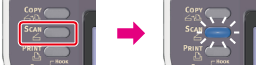
-
Set a document in the ADF.
-
Select a scan type from [Scan Menu], and then press
 (OK).
(OK). -
Press
 to select [Scan Setting], and then press (OK).
-
Press
to select [Duplex Scan], and then press (OK).
-
Press
to select a scan method, and then press (OK).
Available scan methods
OFF*,
 Long Edge Bind,Short Edge Bind
* indicates the factory default setting.
-
Press
 or
or  .
.Scanning starts.