

Specifying a File Name
You can specify a name of a scanned data file.
-
Press
 (SCAN).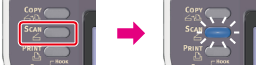
-
Set a document in the ADF or on the document glass.
-
Select a scan type from [Scan Menu], and then press
 (OK).
(OK). -
Press
 to select [Scan Setting], and then press (OK).
-
Press
to select [File Name], and then press (OK).
-
Enter a file name.
You can enter up to 64 characters.
-
Select [Enter], and then press
(OK). -
Press
 or
or  .
.Scanning starts.