

Scanning a Color Document in Monochrome (Grayscale)
If grayscale is enabled, data that is scanned with  (START) is produced with black and white (255 gray levels), not black and white (two values).
-
Press
 (SCAN).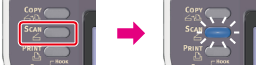
-
Set a document in the ADF or on the document glass.
-
Select a scan type from [Scan Menu], and then press
 (OK).
(OK). -
Press
 to select [Scan Setting], and then press (OK).
-
Press
to select [Grayscale], and then press (OK).
-
Press
to select [ON], and then press (OK).
-
Press
or  .
.Scanning starts.