

Specifying a File Compression Rate
The available file compression rates vary depending on the selected color type.
|
Color type |
Compression Rate |
|---|---|
|
Color |
High, |
|
Mono (Grayscale) |
High, |
|
Mono (Binary) |
High*, |
 Medium,
* indicates the factory default setting.
Memo
Only when the color type is [Mono (Binary)], you can set the compression rate for TIFF.
-
Press
 (SCAN).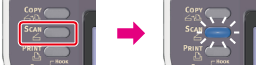
-
Set a document in the ADF or on the document glass.
-
Select a scan type from [Scan Menu], and then press
 (OK).
(OK). -
Press
 to select [Scan Setting], and then press (OK).
-
Press
to select [Compression Rate], and then press (OK). -
Press
to select a color type, and then press (OK). -
Press
to select the encryption level, and then press (OK). -
Press
 or
or  .
.Scanning starts.