

Changing the Number of Copies
You can specify the number of copies to make multiple copies.
-
Press
 (COPY).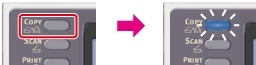
-
Set a document in the ADF or on the document glass.
-
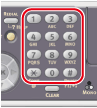
Enter the number of copies by using the 10-key pad.
Memo
-
You can enter the number of copies from 1 to 99.
-
If you enter an incorrect value, press
 (CLEAR), and then enter the correct value.
-
-
Press
 (START).
Copying starts.