

Sorting Each Set in Page Order (Sort)
The sort function is enabled by factory default.
-
Press
 (COPY).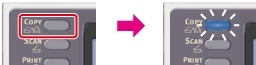
-
Set a document in the ADF or on the document glass.
Memo
-
Continuous Scan mode enables you to copy multiple documents at once.
-
You can use both the ADF and document glass for copying multiple documents as a single job.
-
-
Press
 to display the [Change Settings] menu.
 -
Press
 to select [Sort], and then press
  (OK).
(OK). -
Press
to select [ON], and then press (OK). -
Press
 until the copy start screen is displayed.
 -
Enter the number of copies.
-
Press
 (START).
Copying starts.