

Registering a Destination (Profile) from the Operator Panel
This section describes how to register profiles from the operator panel.
-
Press
 (SETTING).
 -
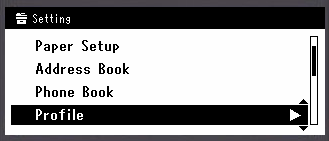
Press
 to select [Profile], and then press
  (OK).
(OK).
-
Press
to select a profile number to register, and then press (OK).
-
Check that [Register] is selected, and then press
(OK). -
Check that [Profile Name] is selected, and then press
 .
. -
Enter a profile name.
-
Select [Enter], and then press
(OK). -
Press
to select [Protocol], and then press . -
Select [CIFS], [FTP], or [HTTP], and then press
(OK). -
Press
to select [Target URL], and then press (OK). -
Enter the values of the transmission destination computer name and the shared folder name in the "
 the transmission destination computer namethe shared folder name" format.
Example:
PC1shareMemo
-
If there is no DNS server in the network, you cannot specify the computer with the computer name (the transmission destination computer name). In such a case, use the IP address of the computer to set.
Example:
192.168.0.3share -
To enter "
" using the QWERTY keyboard, press the <CTRL> key, and then press the <> key.
-
-
Select [Enter], and then press
(OK). -
If access privileges are set to the shared folder, enter the user name and password in [User Name] and [Password].
Note
-
If domain management is performed, enter "User name@domain name".
-
If domain management is performed and you cannot establish a connection even after entering "User name@domain name", delete "@domain name".
Also, access the Web page of this machine, select [Admin Setup] > [Network Menu], and then set the NetBIOS domain name in [Workgroup name] in [NBT].
-
For the domain name, check with your network administrator.
-
-
-
Press
to select [File Name], and then press (OK).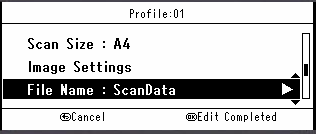
-
Enter a scan file name.
-
If you add "#n" to the end of the file name, a serial number is automatically assigned to the end of the name of a sent file.
-
If you add "#d" to the end of the file name, a date is automatically assigned to the end of the name of a sent file.
-
-
Select [Enter], and then press
(OK). -
Set other items if necessary.
-
Press
(OK).