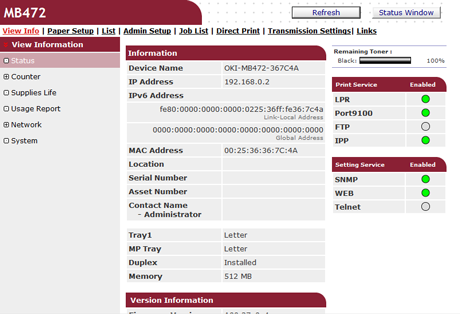
About the Web Page of This Machine
You can operate the following from the Web page on a computer. The Web page can be used for Windows and Mac OS X.
-
Displaying the status of the machine
-
Creating a profile
-
Setting a tray, network, default setting of a function, and the machine
-
Displaying a list of jobs
-
Printing a PDF file without using the printer driver
-
Setting auto delivery and transmission data save
-
Linking to frequently-used Web pages
About the Operating Environment
Memo
-
Check whether your browser is set as follows.
-
Set the security setting for the Web page to the middle level, or enable Cookie.
-
To enter the [Admin Setup] menu, the administrator password is required. The factory default password is "aaaaaa".
-
To change settings of the machine on the Web page, you must log in as the administrator of the machine.
About how to set a network
Improving Security by Encrypting Communication over a Network
The description below uses the following environment as an example.
-
Device name: MB472
-
IP address of the machine: 192.168.0.2
Opening the Web Page from a Computer
-
Open a Web browser.
-
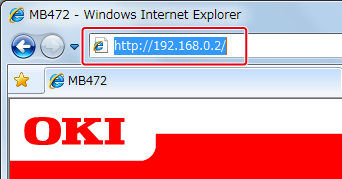
Enter "http://(The IP address of this machine)" in the address bar, and then press the <Enter> key.
About the IP Address of this machine, refer to the Network section of "View Information" of the Setting Menu Items and Functions.
Note
If the IP address includes a value in one or two digits, do not enter "0" before the value. Communications may not be performed correctly.
-
An example of a correct entry: http://192.168.0.2/
-
An example of an incorrect entry: http://192.168.000.002/
-
Logging In as the Administrator
Note
To change settings of the machine on the Web browser, you must log in as the administrator of the machine.
-
Open a Web browser.
-
Enter "http://(The IP address of this machine)" in the address bar, and then press the <Enter> key.
-
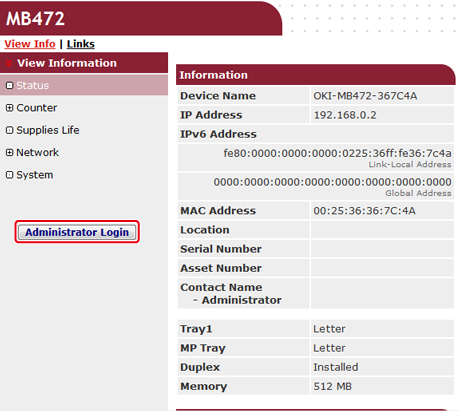
Click [Administrator Login].
-
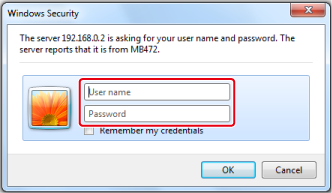
Enter "root" in [User name] and the current password in [Password], and then click [OK].
Memo
The password is the same as the "administrator password" on the operator panel.
-
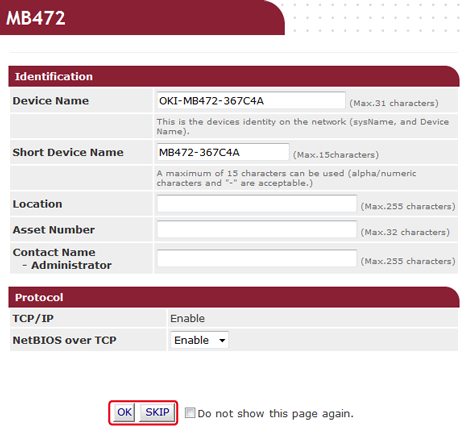
Set the machine information that can be checked on a network, click [OK] or [SKIP].
Note
-
To omit the setting, click [SKIP].
-
Not to display from the next login, select the [Do not show this page again.] check box, and then click [OK] or [SKIP].
-
-
The following screen is displayed.