

Registering the Paper Size, Type, or Weight
After you load paper in Tray 1, Tray 2 (optional), or MP tray, you must register the loaded paper in the machine.
-
Press
 (SETTING).
 -
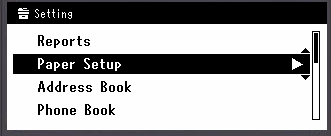
Press
 to select [Paper Setup], and then press
  (OK).
(OK).
-
Press
to select the paper tray in which you loaded paper, and then press (OK).
-
Check that [Paper Size] is selected, and then press
(OK). -
Press
to select the loaded paper size, and then press (OK).
If you select [Custom] for [Paper Size], you must register the custom size.
About how to register a custom size
-
Press
to select [Media Type], and then press (OK).
-
Press
to select the loaded paper type, and then press (OK).
-
Press
to select [Media Weight], and then press (OK).
-
Press
to select the loaded paper weight, and then press (OK).
-
Press
 until the top screen is displayed.