

Selecting from the Transmission History and Reception History
You can select a destination from the most recent 50 records in the transmission history or reception history.
Note
The reception history that is displayed shows receptions with Fcode polling only.
Performing Confidential Communication and Bulletin Board Communication (Fcode Communication)
Memo
Specify a destination in step 5 in "Sending a Fax".
-
Press
 to select [Tx History] or [Rx History], and then press
  (OK).
(OK).
-
Press
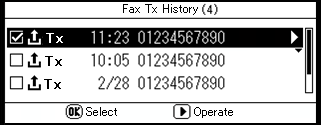
to select an item, and then press (OK).
The check box is selected. You can select multiple items.
-
When you complete the selection of all the destinations, press
 .
. -
Check that [Complete] is selected, and then press
(OK).