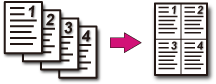
Combining Multiple Pages on One Sheet of Paper (N-in-1)
You can copy two or four pages of a document into one side of a single sheet of paper.
Note
-
Set a document so that its top end is scanned first.
-
To copy a document in your preferred orientation, specify the orientation in [Direction] in advance.
-
If [N-in-1] is enabled, [Zoom] is automatically set to [Auto]. To specify a zoom rate, set [N-in-1], and then [Zoom].
-
A part of the document may not be copied properly depending on the paper size, document size or specified rate.
-
If [N-in-1] is enabled, a paper tray is automatically selected.
-
Press
 (COPY).
-
Set a document in the ADF or on the document glass.
Memo
-
When using the document glass, Continuous Scan mode is automatically enabled. Follow the on-screen instructions.
-
Continuous Scan mode enables you to copy multiple documents at once. You can use both the ADF and document glass for copying multiple documents as a single job.
-
-
Press
 to display the [Change Settings] menu.
-
Press
 to select [N-in-1], and then press
  (OK).
(OK). -
Press
to select an N-in-1 method, and then press
(OK).
Available N-in-1 settings
OFF*,
 2-in-1,4-in-1:
  Vertical,4-in-1:
  Horizontal
* indicates the factory default setting.
-
Press
 (START).
Copying starts.
Printing Methods That Can be Set
Two sheets  One side of a sheet

Four sheets One side of a sheet
-
Vertical
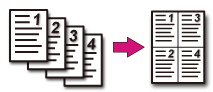
-
Horizontal