

Specifying a Scan Resolution (Resolution)
You can select a resolution to obtain the most suitable quality.
-
Press
 (FAX).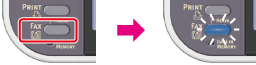
-
Set a document in the ADF or on the document glass.
-
Check that [Fax] is selected, and then press
 (OK).
(OK).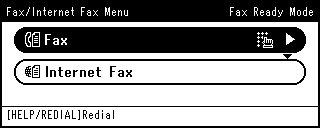
-
Press
 to select [Fax Functions], and then press (OK).
 -
Press
to select [Resolution], and then press (OK). -
Press
to select a resolution, and then press (OK).Available resolution settings
Normal*,
 Fine,Extra-Fine,Photo
* indicates the factory default setting.
Memo
-
[Extra-Fine] may not be available depending on the recipient's machine.
-
If you select [Fine], [Extra-Fine], or [Photo], it takes long to scan a document.
-
-
Press
 until the start screen is displayed.
 -
Specify a destination.
Specify a destination in one of the following ways.
Selecting from the Transmission History and Reception History
-
Press
 (START).
Transmission starts.