

Sending a Fax to Multiple Destinations at the Same Time
You can send a fax to multiple destinations. You can specify up to 100 destinations by using the 10-key pad, speed dial, or group list.
-
Press
 (FAX).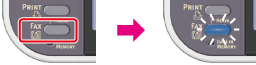
-
Set a document in the ADF or on the document glass.
-
Check that [Fax] is selected, and then press
 (OK).
(OK).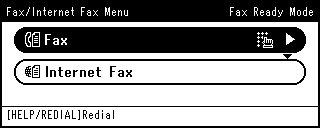
-
Check that [Add Destination] is selected, and then press
(OK). -
Specify a destination.
Specify a destination in one of the following ways.
Selecting from the Transmission History and Reception History
-
Repeat steps 4 and 5 to enter all the destinations.
-
When you complete the selection of all the destinations, press
 (START).
Transmission starts.
Memo
-
To cancel operation, press
 (RESET/LOG OUT).
 -
A group list is useful when you want to broadcast. Register a group list before sending a fax in advance.
-
If [Broadcast Destination] is enabled, destination numbers are displayed before sending.
Checking the Specified Multiple Destinations (Checking Broadcast Destinations)
-
You can cancel a fax transmission.