

Selecting from the Address Book or Group List
You can select a destination from the address book or group list. You must register destinations in the address book or group list in advance.
Registering or Deleting a Destination E-mail Address
Note
If you specify a reply destination of an Internet Fax, you cannot specify a group.
Memo
-
Specify a destination in step 6 in "Sending an Internet Fax".
-
You can register up to 300 destinations in the address book.
-
You can register up to 20 groups.
-
Press
 to select [Address Book] or [Group List], and then press
  (OK).
(OK).
-
Press
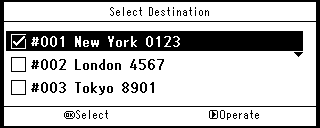
to select a transmission destination or group, and then press (OK).
The check box is selected. You can select multiple items.
-
When you complete the selection of all the destinations, press
 .
. -
Check that [Complete] is selected, and then press
(OK). -
Press
 to return to the start screen.